Choosing the Right 3D Design: A Practical Guide to Layered Cat Paw and Ball Ornaments
For crafters and designers working with laser cutters or CNC machines, selecting the right digital asset is often the difference between a frustrating project and a professional-looking finished piece. Among the growing library of pet-themed designs, the Layered Cat Paw 3D concept has emerged as a popular choice for creating dimensional decor. These designs typically include not just the iconic paw print but often complement it with spherical elements, such as a layered cat ball, to create dynamic tree ornaments or hanging decorations. When evaluating these files, it is essential to look beyond the preview image and understand the technical specifications, file versatility, and assembly requirements involved in bringing a 2D vector into a 3D space.
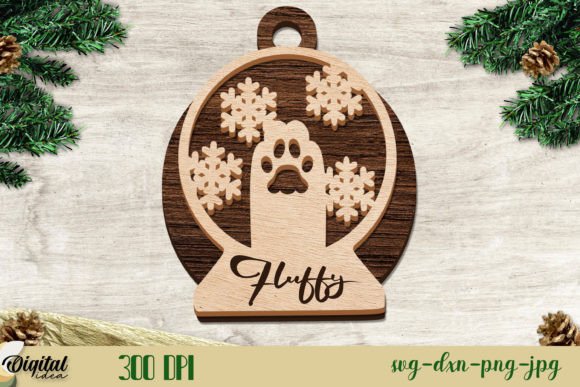
The core appeal of a Layered Cat Paw 3D design lies in its ability to simulate depth using flat materials. Unlike traditional flat cuts that rely solely on engraving or single-layer silhouettes, layered designs stack multiple pieces of material—usually wood, acrylic, or cardstock—to build volume. A high-quality package for this type of project will rarely offer just one file format. Instead, comprehensive bundles provide a zip folder containing designs in SVG, DXF, EPS, PDF, JPG, and PNG formats. This variety ensures compatibility across different software ecosystems, from browser-based tools like Cricut Design Space to professional vector editors like Adobe Illustrator or CorelDRAW, and directly to laser control software like LightBurn.
Understanding File Formats and Software Compatibility
One of the first decision factors when downloading a Layered Cat Paw 3D design is the range of file formats provided. Not all cutting machines or design workflows accept the same data types. For users operating desktop laser cutters, the DXF (Drawing Exchange Format) is often the gold standard due to its precision in defining cut paths without extra metadata that can confuse machine interpreters. Conversely, hobbyists using die-cutting machines may find the SVG (Scalable Vector Graphics) format more intuitive, as it preserves layer groups and colors that simplify the weeding and stacking process.
The inclusion of EPS and PDF files caters to professional graphic designers who need to manipulate the vectors before sending them to production. These formats allow for easy scaling and modification of anchor points if the user wishes to customize the size of the paw or the curvature of the accompanying cat ball element. Meanwhile, JPG and PNG files, while not usable for cutting, serve a critical role in marketing and visualization. They allow creators to generate mockups, list products on e-commerce platforms, or create instructional guides without needing to render the physical object first. A bundle that lacks any of these formats may limit your workflow flexibility, forcing you to convert files manually, which can introduce errors in dimensions or layer alignment.
Comparing Layered Approaches to Traditional Flat Designs
When comparing a Layered Cat Paw 3D design to a standard flat silhouette, the tradeoffs become clear regarding material usage, assembly time, and visual impact. Flat designs are undeniably faster to produce; they require a single pass on the laser cutter and zero assembly time. However, they lack the tactile presence that layered designs offer. The 3D approach creates shadows and highlights that change depending on the viewing angle, making the ornament feel more substantial and premium.
The "layered" aspect specifically refers to the technique of stacking slightly offset copies of the same shape or using progressively smaller shapes to create a beveled edge. In the context of a cat paw, this might involve stacking three to five layers of 3mm plywood to create a raised pad effect. When combined with a Layered Cat Ball 3D element—often designed as a sphere constructed from intersecting rings or stacked discs—the result is a complex, multi-textured object. This complexity is a strength for selling handmade goods, as customers perceive higher value in items that demonstrate intricate construction. However, it is also a limitation for high-volume production runs where speed is the primary metric.
Material Considerations and Structural Integrity
Executing a Layered Cat Paw 3D project requires careful consideration of material thickness and adhesion methods. Most designs are optimized for specific material gauges, commonly 3mm (1/8 inch) or 4mm. If a user substitutes a thicker material without adjusting the design scale, the interlocking tabs (if present) may not fit, or the overall proportions of the paw may appear bulky. Acrylic offers a sleek, modern look with clean edges but requires precise glue application to avoid visible seams. Wood, particularly birch plywood, provides a rustic aesthetic where the layers naturally highlight the grain, but it may require sanding between layers for a smooth finish.
Adhesion is another practical hurdle. Unlike flat signs that hang freely, 3D ornaments must withstand the stress of their own weight and potential movement if hung on a tree. Strong adhesives like CA glue (cyanoacrylate) or specialized wood glues are necessary. Some designers incorporate "finger joints" or press-fit mechanisms into the DXF or SVG files to reduce reliance on glue, but this demands extremely accurate machine calibration. Users with older or less calibrated lasers may find that press-fit designs result in loose assemblies, necessitating a return to adhesive methods.
Evaluating Design Complexity and Assembly Time
A crucial factor in choosing between different 3D cat designs is the assembly complexity. A simple layered paw might consist of five identical shapes stacked directly on top of one another. This is an excellent entry point for beginners or for projects intended for children's workshops. In contrast, a design featuring both a Layered Cat Paw 3D and a Layered Cat Ball 3D component often involves intricate alignment. The ball element may require assembling multiple curved slices in a specific order to achieve a perfect sphere, which can be time-consuming and fiddly.
For those evaluating these designs for commercial purposes, time-per-unit is a vital calculation. While the laser cutting time for a layered design is only marginally longer than a flat one (due to additional cut paths for inner layers), the manual assembly time can increase exponentially. A batch of ten flat ornaments might take an hour to finish, whereas ten complex 3D layered ornaments could take half a day to assemble and glue properly. Therefore, the Layered Cat Paw 3D style is best suited for boutique sales, custom gifts, or decorative pieces where the price point can reflect the labor intensity, rather than for mass-market, low-cost souvenirs.
When to Choose Layered Designs Over Alternatives
Deciding whether a Layered Cat Paw 3D file is the right resource depends largely on the end goal of the project. If the objective is to create a quick, durable tag for a pet collar or a simple keychain, a single-layer design with deep engraving is likely the superior choice. It minimizes failure points and reduces material costs. However, if the goal is to create a holiday ornament, a cake topper, or a wall art piece that serves as a focal point, the dimensional quality of the layered approach is unmatched.
Furthermore, the versatility of receiving a zip folder with SVG, DXF, EPS, PDF, JPG, and PNG files makes these bundles particularly valuable for entrepreneurs who sell both physical goods and digital downloads. A creator can cut the physical ornament for local craft fairs while simultaneously selling the digital files to other makers who possess their own cutting machines. This dual-revenue stream is harder to achieve with proprietary or single-format files.
Ultimately, the Layered Cat Paw 3D design represents a balance between artistic expression and technical execution. It offers a way to elevate simple pet motifs into sophisticated decor through the strategic use of depth and shadow. By understanding the file requirements, material constraints, and assembly commitments, crafters can make informed decisions about whether this style fits their current skill level and business model. Whether used for a personal gift or a product line, the success of the project hinges on selecting a well-constructed file set that aligns with the available tools and the desired aesthetic outcome.